
The dashboard is the first page you see after signing in. It updates by itself as bookings, leads and payments come in, so you can leave it open.
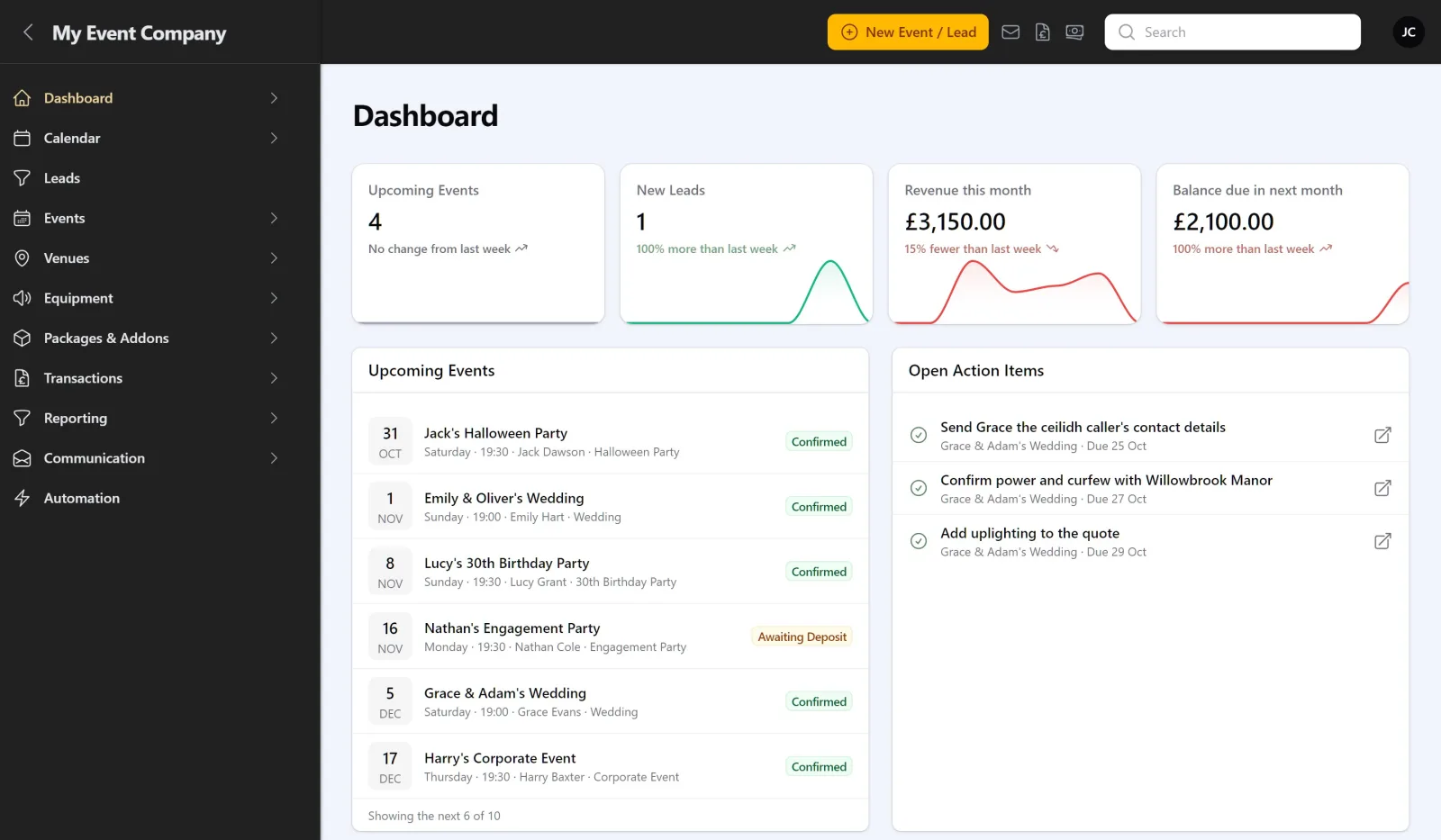
Across the top
- Upcoming Events: how many events are coming up.
- New Leads: leads waiting for you.
- Revenue this month: money received so far this month.
- Balance due in next month: balances due over the coming month.
Each shows a small trend line and how it compares with last week.
The lists
- Upcoming Events: your next events, with the date, time, customer, event type and status. Click one to open it.
- Open Action Items: follow-ups from your meeting notes, with the event and due date. Tick one to mark it done. See Taking meeting notes.
- Overdue invoices: invoices past their due date. See Creating and sending invoices.
Below them is a revenue chart for the months gone by.
Employees
Staff with the employee role see a version showing only the events they are working on and their own action items. They don’t see revenue, balances, leads or invoices.
Getting started
While your account is new, the dashboard is also where the setup wizard and the import banner appear. See Setting up your account.