
Every customer gets their own portal, branded with your logo and colours at your own web address. It is built for phones first, with app-style buttons along the bottom of the screen.
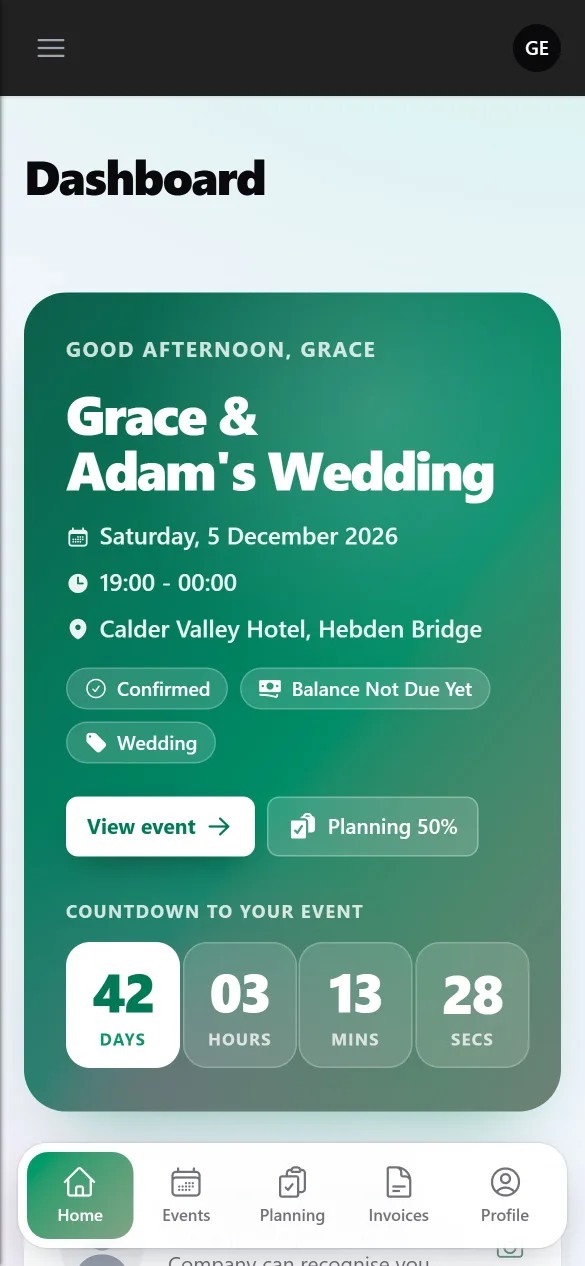
The dashboard
The dashboard is built around the customer’s next event:
- A welcome with the event’s details, a live countdown and shortcuts to the event, planning and payments
- Planning progress: how much of their planning is done, area by area
- Playlist: how many songs have been requested, by how many guests, and the latest ones, with their guest link to copy
- Totals across all their events
Customers with more than one upcoming event can switch between them.
They are reminded to add a profile photo, which then appears next to their name in your events list.
My Events
Each event’s page shows the date, times, venue, package, payments and contract, with tiles for:
- Sign contract while the contract is waiting
- Make a payment for the deposit or balance. See Taking card payments with Stripe.
- Planning, with a percentage showing how much is done
- Notes, which they can edit. These are the event’s client-facing notes.
The venue shows only the details you have chosen to share. See Venue checklists, favourites and the blacklist.
Planning
The planning hub links to up to four areas, each shown only when it’s switched on for the event:
- Event details: the planning form for their event type
- Timeline: the running order of the day
- Playlist: their own song requests and their guests’
- Music preferences: the Spotify playlists they like
See Planning forms for each event type.
Invoices
Any invoices you have issued, with a PDF to download and a button to pay. They never see drafts or voided invoices.
What customers never see
Your internal and employee notes, wages, staff details, meeting notes, other customers and anything about your business’s finances.
To see it for yourself, see Previewing the portal as a customer.